

I bought the Omron Bronze because my doctor asked me to start writing my blood pressure down at home, and the wrist cuff I had been using gave me a different answer every single time I tried it. That is the whole story. No research project, no spreadsheet. I am 67, I retired from a bank in Lawton, Oklahoma, and I needed something I could work before my first cup of coffee.
Here is what I am not going to do. I am not going to tell you this little box saved my life, and I am not going to tell you it is junk. It is a pump, a cuff and a screen. What matters is whether it gives you the same reading twice when you sit the same way, whether the cuff fits your arm, and whether you can stand to use it every day. I have used the Omron Bronze twice a day for long enough to have opinions on all three.
The Quick Verdict
A plain upper arm monitor with a wide cuff and no app. It does the one job well if you sit still, keep spare batteries, and write the numbers down.
Amazon Check Today's Price →The monitor I reach for before coffee, not the one with the most buttons
Upper arm cuff fits 9 to 17 inches, runs on four AA batteries, and shows your reading on a plain LCD. Nothing to pair, nothing to set up, nothing to log into.
Amazon Check Today's Price on Amazon →How I Ended Up Checking Twice a Day
My readings at the doctor's office always ran high. Part of that is the drive into town, part of that is the paper gown, and part of it is that I have never once felt calm in an exam room. My doctor asked me to check at home twice a day for a few weeks and bring the numbers in. That is how a blood pressure monitor ended up in my kitchen drawer next to the takeout menus.
The first machine I tried was a wrist cuff. It was small, it fit in my purse, and it never gave me the same number twice in a row. I would take three readings and get three different answers, and then I would sit there feeling my heart pound, which I am fairly sure did not improve the fourth one. Gene, my husband, who is 70 and retired like me, tried it and got numbers that made no sense at all.
So I went looking for an upper arm cuff, because that is what they use at the clinic and that is what my doctor recommended. The Omron Bronze was the one I landed on. Upper arm, a cuff that covers 9 to 17 inches, batteries, no phone involved anywhere. It weighs about a pound and a quarter and it lives in the kitchen drawer. I have used it long enough now to tell you the good parts and the irritating parts without guessing.
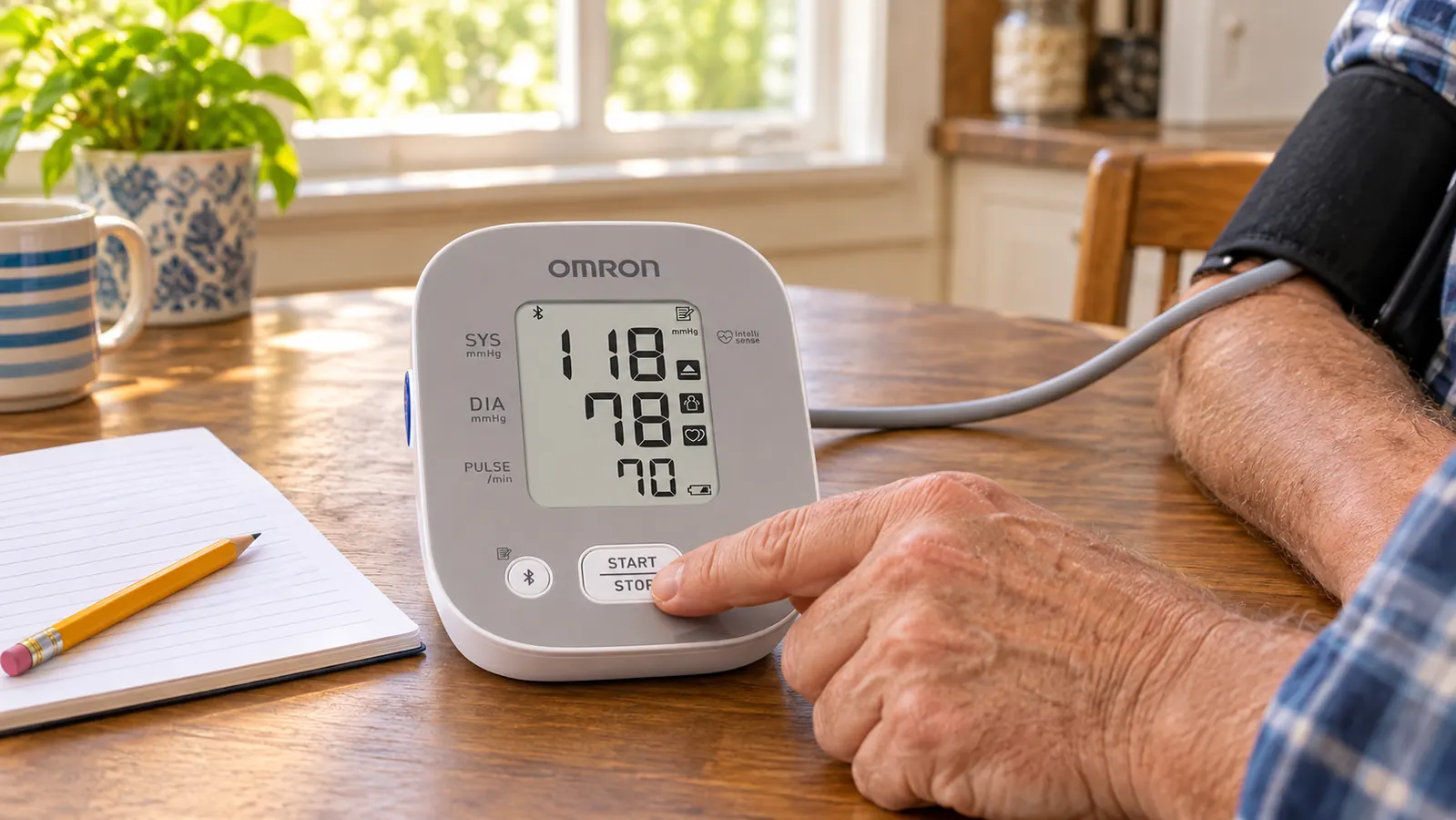
How I've Used It, Morning and Evening
My routine is the same every day. Morning, before coffee, I sit at the kitchen table with my feet flat on the floor and my left arm resting on the table at about heart height. I slide the cuff onto my bare upper arm, run the tube down the inside of my arm, and press the button. The pump runs, the cuff gets tight enough to notice but not tight enough to hurt, and about thirty seconds later the number shows up on the LCD.
Evening is the same thing after supper. Gene takes his turn after me. We use the same monitor and the same cuff, and that is where the 9 to 17 inch range earns its keep, because his arm is bigger around than mine and the cuff still closes on him properly. If two of you are at opposite ends of that range, one of you is going to be right at the edge of it, and that is worth knowing before you order.
I write the numbers on a pad of paper and take the pad to my appointments. That is the whole system. The monitor does keep your past readings so you can scroll back through them, and I have used that more than once when I forgot to write one down, but I do not depend on it. Paper on the counter has never needed batteries.
Setting It Up the First Time
Setup took me about ten minutes, most of which was opening the battery compartment. You put in four AA batteries, plug the tube into the machine, and slide the cuff onto your upper arm. The little book that comes with it shows a diagram of where the cuff should sit and which way the tube should run, and the diagram matters more than it looks. The first time I put the cuff on backwards, the reading was nonsense, and I could not work out why until I looked at the picture again.
The other part of setup is the fit check, and I would tell anyone to do this before they order rather than after. The cuff is sized for arms from 9 to 17 inches around. I measured mine with a cloth tape. The cuff should sit on your bare upper arm about an inch above the bend of your elbow, snug enough that you can slide one finger under the edge but not two. If it slips down while the pump is running, it is too loose and the number is not worth writing down.
What the Omron Bronze Actually Does
The listing talks about Advanced Accuracy Technology, which is Omron's name for how the machine handles the reading. In plain terms, it means the cuff inflates and takes the measurement in a way meant to cut down on errors from moving or talking. I am not a technician and I cannot tell you what is happening inside the box. What I can tell you is that when I sit still and keep my mouth shut, I get numbers that sit close to each other. When I talk or shift around, I get junk, and that has been true of every monitor I have ever used.
There is an irregular heartbeat indicator. If the machine notices something uneven during the reading, a symbol shows on the screen. The first time it happened I sat straight up and worried. Then I read the booklet, which says the symbol can also appear if you moved or if the cuff was not on right, and that it means you should take another reading and mention it to your doctor. That is exactly what I did, and that is exactly what I would tell you to do. It is a flag to bring to an appointment, not a diagnosis.
It also has a hypertension indicator, which alerts you on the screen when a reading is in a higher range. I have mixed feelings about that one. It is useful if you are new to this and do not yet know what the numbers mean. It is less useful at six in the morning when you are half awake and the screen tells you your reading is elevated and your whole day starts on a sour note. I look at the numbers and the indicator, I write them down, and I move on. I do not sit and stare at it.
Same chair, same table, same arm, thirty seconds apart: the Omron Bronze gave me readings within a few points of each other. The wrist cuff I used before never once did that.
What Nobody Tells You Before You Buy
Nobody tells you that the cuff does most of the work. A monitor is a pump and a sensor. The cuff is the part that actually reads your arm. If the cuff is too small, your numbers run high. If it is too loose, your numbers are all over the place. The 9 to 17 inch range on this one covers most adults, but if your upper arm measures more than 17 inches around, this is not your machine and no amount of careful sitting will fix it. Measure your arm with a tape before you order. I wish someone had told me that first.
Nobody tells you the batteries are not in the box, and it takes four AA. That is a small thing until it is seven in the morning, your sleeve is already rolled up, and the screen goes dim. We keep a spare pack in the drawer now. The bigger thing is that this is a battery machine with no app, no Bluetooth, no syncing to your phone and no account to create. If you want your readings to land somewhere automatically, this is the wrong box for you and you should be looking at one of the connected models instead.
Nobody tells you that you are going to get bad readings and have to start over. It happens. You coughed, you talked, the cuff was loose, the tube was kinked under your arm. The machine does not scold you, it just gives you a number that does not belong in the log. I take one more, and if the two are close I write the second one down. If they are far apart, I sit for five minutes and try again. That is not a flaw in the monitor, that is just how this works.
And nobody warns you that sharing one machine takes a little organizing. Gene and I use the same monitor, so we write our initials next to each number on the pad. When I take the log in, my doctor can tell which readings are mine and which are his. Decide that part up front if two of you are using it, because a page of numbers with no names on it is not much use to anybody.
What I Liked
- Upper arm cuff, the same style used in a clinic, in a 9 to 17 inch size range
- Plain LCD screen and one button to start, nothing to pair or log into
- Irregular heartbeat indicator and hypertension indicator both show on screen
- Runs on four AA batteries with no cord and no outlet needed
- Keeps your past readings so you can scroll back if you forget to write one down
Where It Falls Short
- No app, no Bluetooth, no automatic logging to your phone
- Batteries are not included and it will quit on you at the worst moment without spares
- The tube means you are tethered to the table while it reads
- The hypertension indicator can rattle you first thing in the morning
- Will not give a trustworthy reading on an upper arm over 17 inches

The Part Where You Take It to Your Doctor
I want to be clear about something. Nothing I write here is medical advice, and I am not going to tell you what your numbers mean. I am a retired bank teller. What I can tell you is what my doctor asked for, which was a written log of readings taken at home, morning and evening, over a few weeks. The paper pad has been more useful to her than any single number on a screen, because she can see the pattern instead of one moment in a cold exam room.
The one thing I would add is to bring the machine with you to an appointment if you can. My doctor had me take a reading in the room with my cuff and compared it to the one her nurse took. That comparison told her more about my home numbers than anything I could have said out loud. And if the irregular heartbeat indicator ever shows on your screen, say so at your next visit instead of lying awake about it. That is what the symbol is for.
What I Would Change
If I could change one thing, I would make the screen easier to read in a dim kitchen. The LCD is clear as day in daylight, but in January at six in the morning I have turned the machine toward the window more than once and squinted at it. That is a small complaint. It is also the complaint I think about most often, which tells you something about how few real problems there are with this thing.
The second change would be to put the batteries in the box. Four AA batteries are not a hardship, but they are also not included, and the machine is dead weight without them. We keep a pack in the drawer beside the monitor now. That single change would save every buyer one irritating first evening and one trip to the store.
Who This Is For
This is for you if you want one plain upper arm monitor, if your upper arm measures somewhere between 9 and 17 inches around, and if you are willing to sit still for a minute and write the number down. It suits a couple sharing one machine, because the cuff range covers two very different arms. It suits anyone who would rather not fiddle with a phone app before coffee. And it suits the person who is going to carry a paper log into an appointment, which is what my doctor actually asked for.
Who Should Skip It
Skip it if your upper arm measures more than 17 inches around, because the cuff will not give you a reading you can trust and you need a different size instead of a different technique. Skip it if you want your numbers to go straight into an app, because this machine does not do that and no amount of wishing will add it. And skip it if you are not going to use it. A monitor in a drawer is not helping anybody, and I say that as someone who let a wrist cuff sit in a drawer for the better part of a year.
If you are going to write the numbers down anyway, start with a machine that gives you numbers worth writing
Upper arm cuff from 9 to 17 inches, four AA batteries, plain LCD, no app to set up. My pad of readings has sat on the kitchen counter for months, and that was the whole point.
Amazon Check Today's Price on Amazon →